Best 3 Budget Microphones Worth Buying Under $100: Affordable Mics For Streamers & Podcasters

Updated: 4 days ago

I Tested the Specs So You Don't Have To:
A good microphone can completely change the way people experience your content.
Whether you're streaming on Twitch, recording YouTube videos, starting a podcast, creating voiceovers, or simply building a community online, your voice is a major part of your brand. Viewers might forgive a camera that isn't perfect, but poor audio can make even the best content difficult to enjoy.
I've been creating content and working with audio for years. I started making music long before I became a streamer, and I've spent a lot of time recording vocals, working with microphones, and learning what separates a microphone that simply "works" from one that actually enhances the experience.
I've been streaming since 2020, and through that journey I've learned that choosing the right microphone is about more than just finding something that picks up your voice. A good streaming microphone should capture the personality, tone, and character of your voice while helping reduce unwanted background noise, room sounds, keyboard clicks, and other distractions.
This is especially important for streamers.
Your microphone is not just a piece of equipment sitting on your desk. It's part of your setup, your brand, and sometimes the main connection between you and your audience. Many streamers spend hours designing their overlays, scenes, lighting, and visual identity—but forget that their voice is often the thing viewers spend the most time experiencing.
For some creators, the microphone is the entire experience. Maybe you're doing a cozy stream, a late-night gaming session, a podcast, a VTube stream, or content where you aren't always on camera. In those situations, your voice has to carry the connection.
And if you have a naturally unique voice—a deep voice, a soothing voice, a textured voice, or a voice with a lot of personality—the right microphone can highlight those qualities instead of flattening them.
The good news is that you don't have to spend hundreds of dollars to get quality audio anymore.
As streaming, podcasting, and online content creation exploded over the last several years, microphone companies started creating affordable options designed specifically for everyday creators. Today's budget microphones offer features that used to only be available on much more expensive equipment: USB connectivity, XLR upgrades, better noise rejection, monitoring options, and designs that actually look good on camera.
That means new creators don't have to choose between spending a fortune or settling for low-quality equipment.
You can build a professional-looking and professional-sounding setup without breaking the bank.
In this guide, we're taking a closer look at three budget microphones under $100 that are highly recommended by creators and reviewers. We'll compare their features, strengths, weaknesses, and who each microphone is best suited for—so you can choose the one that fits your content style and your budget.
Let's get into it.
1. FIFINE AM8 — Best Overall Budget Microphone for Streamers
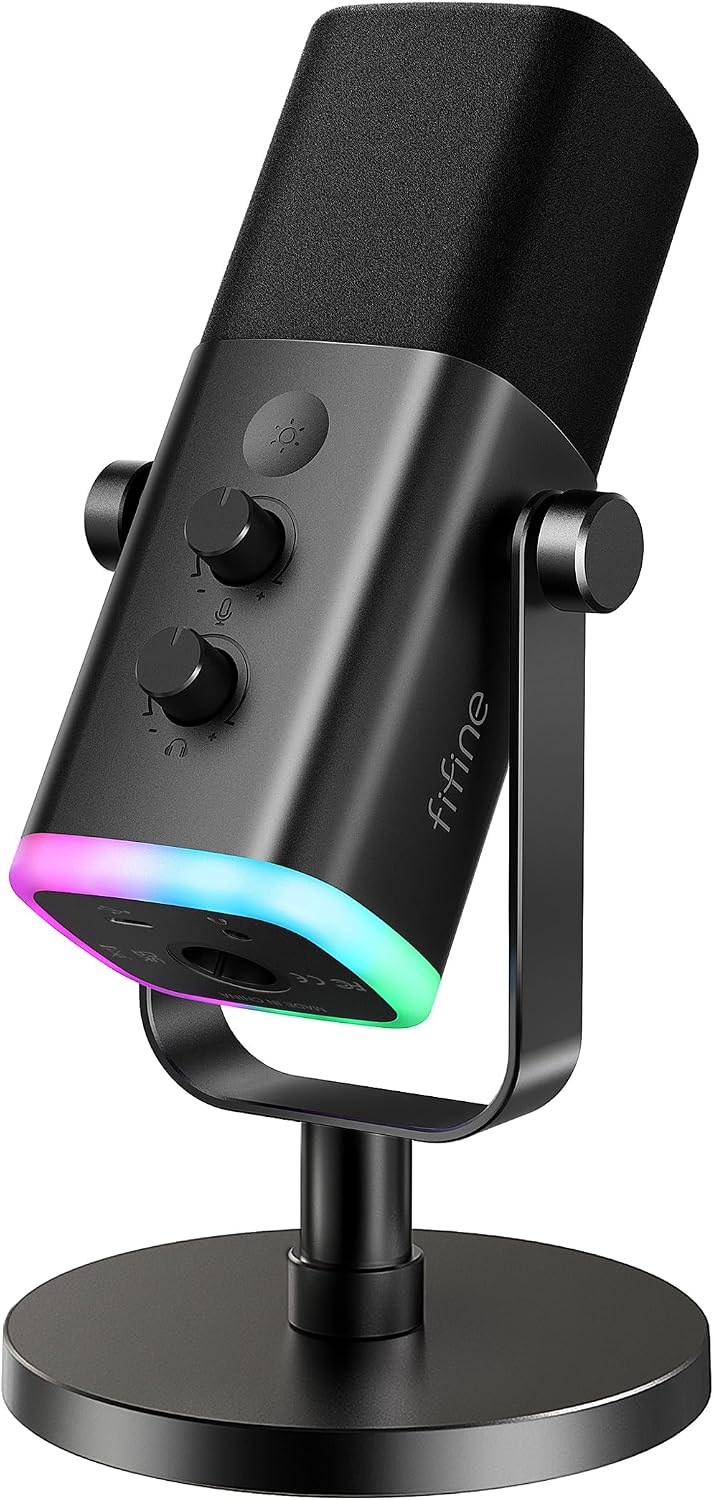
Best for: Twitch streamers, YouTubers, beginner podcasters, gamers, and creators who want professional features without the professional price tag
When I started looking at budget microphones for creators, the FIFINE AM8 immediately stood out because it checks a lot of boxes that matter for streamers.
A lot of beginner creators make the mistake of thinking they need to spend several hundred dollars on a microphone to get good audio. While premium microphones absolutely have their place, the reality is that today's budget microphones have improved dramatically—and the FIFINE AM8 is a perfect example of that.
At around the $50–$60 price range, the AM8 delivers features that would have been considered premium not that long ago.
You get USB connectivity for a simple plug-and-play setup, but you also get an XLR connection if you decide to upgrade your audio setup later with an interface or mixer. That flexibility makes it a microphone you can grow with instead of something you'll immediately outgrow.
You can check the current price and availability of the FIFINE AM8 on Amazon here:
FIFINE AM8 Key Features
Dynamic microphone design
USB-C and XLR connectivity
Cardioid pickup pattern
Built-in headphone monitoring
Microphone gain control
Headphone volume control
Touch mute button with indicator light
Customizable RGB lighting
Compatible with PC, Mac, gaming setups, and streaming environments
Why Streamers Like the FIFINE AM8
One of the biggest strengths of the FIFINE AM8 is that it was clearly designed with modern creators in mind.
The microphone looks good on camera, which matters more than some people realize. If your microphone is sitting in front of you during every stream, podcast, or YouTube recording, it becomes part of your visual brand. The RGB lighting gives creators another way to customize their setup and match their overall aesthetic.
But the biggest selling point is still the audio.
Customer reviews consistently praise the AM8 for delivering clear, professional-sounding audio at a price point where many people expect something average. Multiple users mention that it was a noticeable upgrade over headset microphones, with cleaner vocals and better overall clarity.
For streamers especially, the built-in controls are extremely convenient. Being able to quickly adjust gain, control headphone volume, or mute your microphone without digging through software settings is a small feature that makes a big difference during a live broadcast.
The USB connection makes it beginner-friendly, while the XLR option gives more advanced creators room to expand.
That combination is what makes the AM8 stand out.
Pros
✅ Excellent price-to-performance ratio
✅ USB and XLR connectivity
✅ Great choice for beginners who may upgrade later
✅ Clear, balanced vocal sound
✅ Built-in headphone monitoring
✅ Easy-to-access mute button
✅ RGB lighting adds personality to streaming setups
✅ Works well for streaming, gaming, podcasting, and voice recording
Cons
❌ USB connection issues have been reported by some users
❌ RGB features only work when using USB mode
❌ Like most dynamic microphones, placement matters—speaking too far away or setting gain too high can reduce quality or pick up unwanted sounds
My Streamer Take
For new streamers, the FIFINE AM8 is probably the microphone on this list that gives you the most features for your money.
What I like about it from a creator perspective is that it understands what modern streamers actually need. You don't just need a microphone that sounds good—you need something that is easy to use, looks good on camera, gives you control while you're live, and leaves you room to grow.
Your microphone is one of the first things your audience experiences. Whether you're gaming, chatting with your community, recording videos, or doing voice-focused content, having clean, reliable audio makes your content feel more professional.
The FIFINE AM8 proves you don't have to spend hundreds of dollars to get there.
Affiliate Disclosure: I may earn a commission from qualifying purchases.
2. MAONO PD200X — Best Feature-Packed Budget Microphone for Streamers
Best for: Creators who want a microphone that looks good on camera, sounds professional, and offers room to upgrade later

The MAONO PD200X is a great example of how much budget creator equipment has improved.
A few years ago, features like USB connectivity, XLR compatibility, software controls, RGB customization, headphone monitoring, and professional-looking designs were typically reserved for much more expensive microphones.
Today, creators can get many of those same features without spending hundreds of dollars.
The MAONO PD200X is a dynamic USB/XLR microphone designed for streamers, podcasters, gamers, voice creators, and anyone looking to upgrade from a headset microphone.
You can check the current price and availability of the MAONO PD200X on Amazon here:
MAONO PD200X Key Features
Dynamic microphone capsule
USB-C and XLR connectivity
Cardioid pickup pattern
40Hz–16kHz frequency response
Built-in headphone monitoring
Adjustable microphone gain and headphone volume
One-touch mute button with LED indicator
Customizable RGB lighting
MAONO Link software for EQ, compressor, limiter, and audio adjustments
Compatible with streaming, podcasting, gaming, voiceover, and recording setups
Why Streamers Like the MAONO PD200X
The biggest advantage of the MAONO PD200X is flexibility.
For someone just starting out, USB makes setup incredibly simple. Plug it into your computer, adjust your settings, and you're ready to start creating.
But unlike many beginner microphones, the PD200X also gives you an upgrade path. If you eventually purchase an audio interface or mixer, you can switch to XLR without replacing your microphone.
That matters because your first microphone doesn't have to be your last microphone.
Customer reviews consistently highlight the clarity of the microphone's sound, especially compared to headset microphones. Many users mention that friends, viewers, and gaming communities immediately noticed an improvement in their voice quality after switching to the PD200X.
For streamers, small quality-of-life features also matter. The built-in mute button, gain controls, and headphone monitoring allow creators to make quick adjustments during live broadcasts without stopping what they're doing or searching through software menus.
The visual design is another bonus. The RGB lighting and multiple color options make this microphone easy to incorporate into a gaming setup or streaming background where your equipment becomes part of your overall brand aesthetic.
Pros
✅ Clear, professional-sounding vocal quality
✅ USB and XLR connectivity
✅ Great upgrade path for growing creators
✅ Built-in controls for live adjustments
✅ Headphone monitoring included
✅ RGB customization and software controls
✅ Comes with creator-friendly accessories in some kits
✅ Excellent value compared to higher-priced microphones
Cons
❌ Some users report durability concerns with included accessories
❌ RGB and software features require USB connection
❌ XLR cable is sold separately
❌ Like any dynamic microphone, proper positioning and gain settings are important for the best sound
My Streamer Take
The MAONO PD200X is the microphone I would recommend to creators who want their setup to feel more "complete."
The FIFINE AM8 focuses on delivering a lot of value at an affordable price. The MAONO PD200X takes that same idea and adds more creator-focused features that make it feel like a step toward a professional setup.
I especially like that it doesn't force beginners to choose between simplicity and growth. You can start with USB, learn your audio settings, and later move into an XLR setup without needing to buy a completely new microphone.
For streamers building a brand, that's a big advantage.
A microphone is not just about recording your voice. It's part of your workflow, your appearance on camera, and the overall experience your audience has when they spend time with your content.
The MAONO PD200X gives creators a lot of that professional feel while staying comfortably within a budget.
Affiliate Disclosure: I may earn a commission from qualifying purchases.
3. HyperX SoloCast 2 — Best Beginner-Friendly USB Microphone for New Streamers
Best for: New streamers, gamers, and creators who want excellent audio without complicated setup

Not every creator needs an XLR microphone, an audio interface, or a complicated audio chain.
Sometimes the best microphone is the one that lets you plug it in, adjust a few settings, and immediately start creating.
That is where the HyperX SoloCast 2 shines.
You can check the current price and availability of the HyperX SoloCast 2 on Amazon here:
The SoloCast 2 is a compact USB condenser microphone designed for gamers, streamers, podcasters, remote workers, and content creators who want a noticeable upgrade over a headset microphone without investing in additional equipment.
HyperX SoloCast 2 Key Features
USB-C to USB-A plug-and-play connection
Cardioid polar pattern
24-bit / 96kHz recording capability
Built-in pop filter
Built-in shock reduction system
Tap-to-mute sensor with LED indicator
Adjustable desktop stand
Standard 3/8" and 5/8" mounting threads for boom arms
HyperX NGENUITY software support
Customizable audio filters including high-pass, low-pass, and voice enhancement
Why Streamers Like the HyperX SoloCast 2
The biggest selling point of the SoloCast 2 is simplicity.
Many new creators get overwhelmed when they start researching microphones. They see discussions about XLR cables, audio interfaces, gain staging, compressors, EQ, and other audio terms before they have even streamed their first broadcast.
The SoloCast 2 removes much of that complexity.
Connect it through USB, select it as your microphone, and start recording.
Customer reviews consistently praise the microphone's clear voice reproduction, compact design, and ease of use. Many users mention that it provides a significant improvement over headset microphones while maintaining a beginner-friendly setup.
The built-in tap-to-mute feature is especially useful for live creators. During a stream, podcast, or gaming session, being able to instantly mute your microphone without clicking through software menus is a small feature that makes a big difference.
The compact design is another advantage. Not every creator has a large streaming desk, and the SoloCast 2's smaller footprint makes it a good option for setups where space is limited.
Pros
✅ Extremely easy setup
✅ Great audio upgrade from headset microphones
✅ Compact design that fits smaller desks
✅ Built-in pop filter and shock reduction
✅ Tap-to-mute feature is excellent for livestreaming
✅ Boom arm compatible
✅ HyperX software adds customization options
✅ Excellent choice for beginners
Cons
❌ USB only — no XLR upgrade path
❌ Condenser design can pick up more room noise than dynamic microphones
❌ Built-in stand is functional but a boom arm may improve positioning
❌ Best results require staying close to the microphone
My Streamer Take
The HyperX SoloCast 2 is proof that beginners do not need to overspend to sound professional.
A lot of new streamers make the mistake of thinking they need expensive equipment before they start creating. The truth is that clean, consistent audio matters more than having the most expensive microphone on the market.
The SoloCast 2 gives creators exactly what they need: clear vocals, simple operation, and a professional upgrade over a gaming headset microphone.
For someone starting their first Twitch channel, YouTube channel, podcast, or voice-based content project, this is the kind of microphone that lets you focus on creating instead of troubleshooting.
It is simple, reliable, and gets the job done.
Affiliate Disclosure: I may earn a commission from qualifying purchases.
FAQ
What is the best microphone under $100?
If you're looking for the best overall value, the FIFINE AM8 stands out thanks to its combination of excellent sound quality, USB and XLR connectivity, built-in monitoring controls, and an affordable price. However, the best microphone ultimately depends on your content, recording environment, and future upgrade plans.
Is USB or XLR better for beginners?
For most beginners, a USB microphone is the easiest choice because it plugs directly into your computer without requiring additional equipment. XLR microphones provide more flexibility and upgrade options, but they require an audio interface or mixer. If you want the best of both worlds, consider a microphone that supports both USB and XLR.
Do I need an expensive microphone to stream on Twitch?
No. Many budget microphones under $100 produce excellent audio quality for Twitch, YouTube, podcasting, and livestreaming. Good microphone placement, proper gain settings, and a quiet recording space often make a bigger difference than spending hundreds of dollars.
Are dynamic microphones better than condenser microphones?
Neither is universally better—it depends on your environment. Dynamic microphones are popular with streamers because they naturally reject more background noise, making them ideal for gaming setups and home offices. Condenser microphones capture more detail but also tend to pick up more room noise, keyboard clicks, and echoes.
Can I podcast with a $50 microphone?
Absolutely. Modern budget microphones have improved dramatically over the last several years. Many creators produce podcasts, YouTube videos, livestreams, and voiceovers using microphones that cost well under $100.
What type of microphone is best for Twitch streaming?
Many Twitch streamers prefer dynamic microphones because they help reduce background noise while keeping vocals clear and focused. If you stream in a room with computer fans, mechanical keyboards, or other distractions, a dynamic microphone is often the better choice.
Which microphone is best for gaming?
Gamers generally benefit from microphones that emphasize clear voice communication while minimizing background noise. A dynamic microphone is usually the better option for gaming setups, especially if you play with mechanical keyboards or stream in shared spaces.
Can I use these microphones for YouTube videos?
Yes. All of the microphones featured in this guide are suitable for YouTube videos, podcasts, livestreams, voiceovers, online meetings, and other forms of content creation.
Do I need an audio interface?
Not if you're using the microphone through USB. Audio interfaces are only necessary when using an XLR connection. Many modern microphones include both USB and XLR outputs, allowing creators to start with USB and upgrade later without replacing their microphone.
How close should I be to my microphone?
Most microphones perform best when positioned approximately 2 to 6 inches from your mouth. Speaking closer generally produces fuller, clearer audio while reducing unwanted background noise. Using a boom arm can also help maintain consistent microphone placement.
Will a better microphone improve my stream?
In many cases, yes. Clear, professional-sounding audio can improve the overall viewing experience and help your content feel more polished. While viewers may overlook average video quality, poor audio is one of the most common reasons people leave a livestream or video.
Should I buy a boom arm?
A boom arm isn't required, but it can significantly improve microphone positioning, free up desk space, and reduce vibrations caused by typing or bumping your desk. Many creators consider it one of the most worthwhile accessories for improving audio quality.
Do USB microphones sound professional?
Yes. Today's USB microphones offer impressive audio quality and are capable of producing professional-sounding recordings for streaming, podcasting, YouTube videos, and voiceover work. Many creators use USB microphones for years before ever feeling the need to switch to XLR equipment.
What's the difference between a cardioid microphone and other pickup patterns?
A cardioid microphone is designed to capture sound primarily from the front while reducing noise from the sides and rear. This makes it one of the most popular pickup patterns for streamers, podcasters, and solo creators who want to focus on their voice.
What should I look for when buying a budget microphone?
When choosing a microphone, consider more than just price. Look for sound quality, connection type (USB, XLR, or both), background noise rejection, monitoring features, mute controls, build quality, compatibility with your setup, and whether the microphone gives you room to upgrade as your content grows.
If you're building out your streaming, gaming, recording, or creator setup, check out the E9T9 Gear Guide. I’ve collected microphones, capture cards, computer gear, lighting, cables, and other equipment that can help you solve setup problems, upgrade what you already have, or figure out what you actually need next.


Comments